
The Power of Google Search Console: Know What Google Knows About Your Business

For business owners, staying ahead of the competition and ensuring your website performs optimally on Google is crucial. One powerful tool that can provide you with valuable insights into your site’s performance is Google Search Console (GSC).
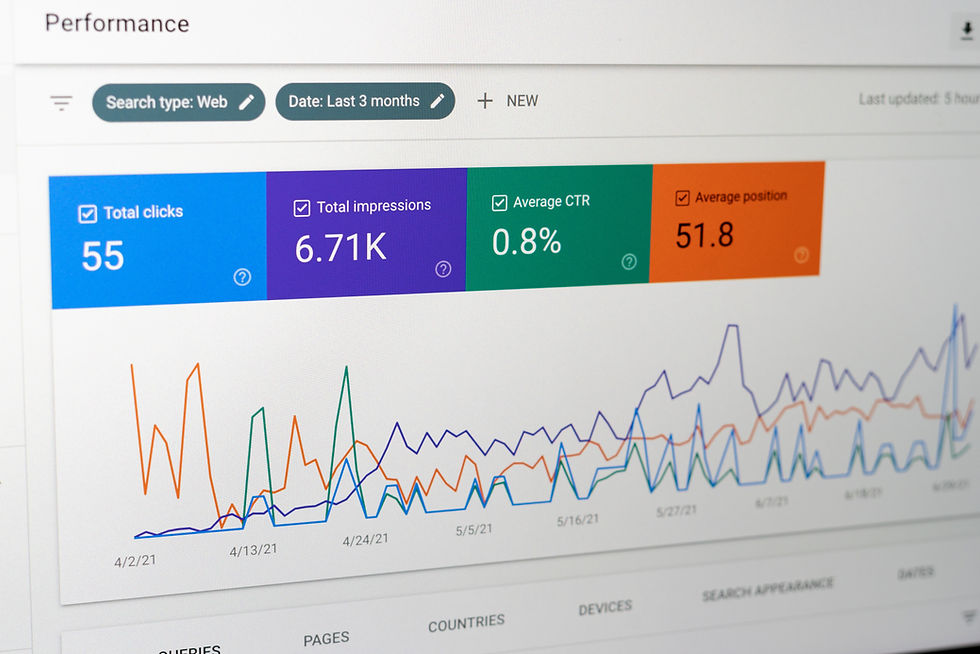
If you're looking to understand how Google views your website and to unlock actionable data that can improve your SEO strategy, GSC is indispensable.
This article will guide you through the key features of Google Search Console and how you can use it to increase your site’s visibility, identify opportunities for growth, and fix common SEO issues.
What is Google Search Console?
Google Search Console is a free tool offered by Google that helps website owners understand how their site performs in Google search results. It serves as a control panel that gives you essential insights into your website’s health, indexing status, traffic performance, and potential SEO issues. Unlike Google Analytics, which shows you user activity on your site, Google Search Console shows you how Google interacts with your site, including the search queries that lead users to your content.
Think of it as Google’s way of communicating directly with you about your site’s performance. It helps you identify issues that could affect your SEO efforts, such as pages that are not indexed, crawl errors, or poor mobile usability. Without GSC, you'd be blind to these critical insights.
Why Your Business Needs Google Search Console

Track Your Site’s Health - Google Search Console helps you monitor the overall health of your website. It alerts you to any errors, such as pages that aren’t being indexed, security issues like malware, or performance drops. These notifications are vital in ensuring your site is functioning properly and is not penalized by Google’s algorithms.
Improve Your SEO Performance - The “Performance” report in GSC provides key metrics that help you track your site’s performance in search results. This includes the number of clicks your pages received, how often they appeared in search results, and the average position of your site for specific keywords. By analyzing this data, you can refine your SEO strategy, focus on high-performing keywords, and optimize underperforming pages.
Identify and Fix Indexing Issues - Google Search Console makes it easy to identify pages on your website that are not being indexed by Google. These pages might have technical issues that prevent them from being included in search results. You can use the "URL Inspection Tool" to check the indexing status of individual pages and request Google to re-index them if necessary. This ensures that all your important content is discoverable by searchers.
Monitor Backlinks and Internal Links - Backlinks play a crucial role in SEO, and GSC provides valuable data on who is linking to your site and which anchor texts are being used. Additionally, GSC shows you how your internal links are structured, allowing you to optimize your site’s internal linking strategy.
Receive Alerts and Notifications - One of the most powerful features of Google Search Console is its ability to alert you to issues with your site. If there’s a problem, such as a security breach or a sudden drop in traffic, you’ll be notified immediately, allowing you to take swift action to resolve it.
Key Reports and Features in Google Search Console
Performance Report - The performance report is the heart of Google Search Console, providing detailed data on how your website is performing in Google search. It shows you the total number of clicks, impressions, and the average position of your site. For small business owners in the Growth stage, this report is crucial for identifying what’s working in your SEO strategy and what needs improvement.
Pro Tip: Filter your performance report by country and query. This allows you to track how your site performs in specific regions and for particular keywords, giving you a clearer view of where you need to focus your efforts.
URL Inspection Tool - This tool lets you check the indexing status of specific pages on your website. You can see if a page is indexed, when it was last crawled, and any issues Google encountered while crawling it. If necessary, you can request Google to re-crawl your pages, ensuring they are up-to-date in search results.
Sitemap Submission - Sitemaps help Google understand the structure of your website and index your pages more efficiently. GSC allows you to submit your sitemap directly to Google. This ensures that all your key pages are included in search results and helps you monitor any issues with your sitemap.
Mobile Usability Report - As mobile-first indexing becomes the standard, ensuring your website is mobile-friendly is crucial. The mobile usability report in GSC highlights any issues that may affect users’ experience on mobile devices, such as text that’s too small to read or buttons that are too close together.
Manual Actions and Security Issues - If Google detects any violations of its webmaster guidelines or security issues such as malware, GSC will notify you with a manual action report. This allows you to resolve any issues promptly and maintain a clean, compliant website.
How to Set Up Google Search Console
Setting up Google Search Console is a straightforward process, but it does require a few steps:
Verify Your Website Ownership - To use GSC, you need to verify that you own the website. You can do this by adding a meta tag to your site’s HTML code, uploading an HTML file to your website, or verifying through Google Analytics or Google Tag Manager. The verification process ensures that only the rightful owner can access the data in GSC.
Submit Your Sitemap - Once verified, submit your website’s sitemap to Google through the "Sitemaps" section in GSC. This helps Google crawl your site more efficiently and ensures that all your pages are indexed.
Monitor and Optimize - After setting up GSC, monitor the performance and indexing reports regularly. Pay attention to issues like crawl errors, manual penalties, and mobile usability problems. Regularly request indexing for updated pages and optimize those that are underperforming.
Common Issues in Google Search Console
Pages Not IndexedIf certain pages aren’t indexed by Google, you can use the URL Inspection Tool to check for errors. Often, the issue may be with the content quality, such as duplicate or thin content. Once you fix the issue, you can request re-indexing.
Crawl ErrorsGoogle may encounter errors when trying to crawl your pages. These errors could be caused by server issues, broken links, or incorrect URL configurations. GSC will notify you of these issues, allowing you to fix them before they impact your SEO.
Manual PenaltiesIf Google detects a violation of its guidelines, it may apply a manual penalty to your site. This can severely affect your search rankings. GSC will notify you if a penalty is applied, and you’ll need to take corrective actions to have the penalty lifted.
Conclusion: Why Google Search Console is Essential for Your Business

Google Search Console is a must-have tool for any business owner serious about improving their online presence. It provides valuable insights into your website’s performance, alerts you to potential issues, and helps you optimize your content for better visibility. By using GSC to monitor indexing, track performance, and resolve technical issues, you ensure that your website remains competitive in search results.
Whether you're looking to grow your business or maintain its position in search rankings, Google Search Console is an essential tool for achieving your SEO goals. If you haven’t set it up yet, now is the time to get started and unlock the full potential of your website’s visibility on Google.
This article was delivered as part of a presentation by Realise Business for the Digital Solutions Program with advisor, Pulkit Agrawal. To attend our events, click here.

Pulkit Agrawal
Pulkit is a veteran SEO strategist with 15 years of experience driving growth for brands across diverse industries. Named one of Australia’s Top 20 Digital Marketers by The Australian Business Journal, he is a trusted advisor known for delivering consistent, high-impact search results.
Realise Business is a not for profit organisation that supports small businesses across Australia, having helped over 35,000 businesses through coaching, training, and strategic support. The Digital Solutions Program is a federally funded initiative.


Comments